
Skip to content
Issuer CIFAS marker

How to Challenge & Remove a Dell CIFAS Marker

A Dell CIFAS marker filed against your name can close your bank accounts, block your mortgage, and cost you your job, for up to six years unless you make a proper complaint. We have reviewed 1,657 Financial Ombudsman decisions and documented over 80 removals across 25+ UK institutions. We prepare every document your complaint needs, from the first request to the court bundle if it comes to that.

80+ Cifas Case Studies1,657 FOS decisions reviewedFast 15-Working-Day Timelines
CIFAS marker removal webinar and complaint support presentation.
Weekly live strategy webinars help you understand each response and next document.

Dell

What Is A Dell CIFAS Marker?

If Dell has filed or may have filed a CIFAS marker after an account review, application, transaction dispute, payment investigation, or product closure, this page explains how the filing can be challenged using your CIFAS report, Dell records, supporting evidence, and the correct escalation route.
Dell

What Is A Dell CIFAS Marker?

A Dell CIFAS marker is a fraud-risk record connected to application, account, product, transaction, affordability, or fraud investigation records. It is not a normal credit issue. It is a fraud-risk filing on the National Fraud Database and should be reviewed against the CIFAS category used, the records held by Dell, and the evidence relied on when the marker was filed.

Research identifies Dell Corporation Limited / Dell Bank International d.a.c. as the relevant legal entity for Dell, trading as Dell / Dell Financial Services, company number 02081369, FCA reference 778776. Dell UK contact page states Dell Corporation Limited is FCA authorised with limited permission as a credit broker under FRN 778776. DFS privacy page identifies Dell Bank International d.a.c. trading as Dell Financial Services and privacy@dell.com.

In a Dell case, the marker may relate to:

  • The application or onboarding process
  • Affordability, income, or supporting information
  • Transaction, account, or product records
  • Identity or fraud prevention checks
  • How the product, account, or facility was obtained or used

The key point is simple. Dell must be able to justify the marker with evidence, not suspicion, assumption, or a general account concern.

Dell

Can A Dell CIFAS Marker Be Removed?

Yes. A Dell CIFAS marker can be removed if the filing cannot be properly justified. The issue is not simply whether Dell had concerns. The issue is whether the evidence meets the required standard for a CIFAS marker.

We use the CIFAS Civil Dispute Framework to complain about:

  • Whether the correct CIFAS category was used
  • Whether Dell had clear evidence of deliberate dishonesty
  • Whether the marker was based on evidence rather than suspicion
  • Whether innocent explanations, scams, pressure, vulnerability, or third-party involvement were considered
  • Whether the marker is accurate, fair, and lawful under data protection principles
  • Whether the marker should be removed, corrected, or restricted

You do not need to guess what to write. Upload your CIFAS report, Dell records, and supporting evidence. We prepare the complaint documents needed to dispute the marker properly and guide the next stage if Dell refuses to remove it.

Dell

Need Help with Your Dell Cifas Appeal?

If you don't have the time to navigate the complaints process or analyse complex DSAR files, our specialist team can review your case. We draft bespoke, evidence-backed appeal packages designed to meet CIFAS Principle 4 standards.

Dell

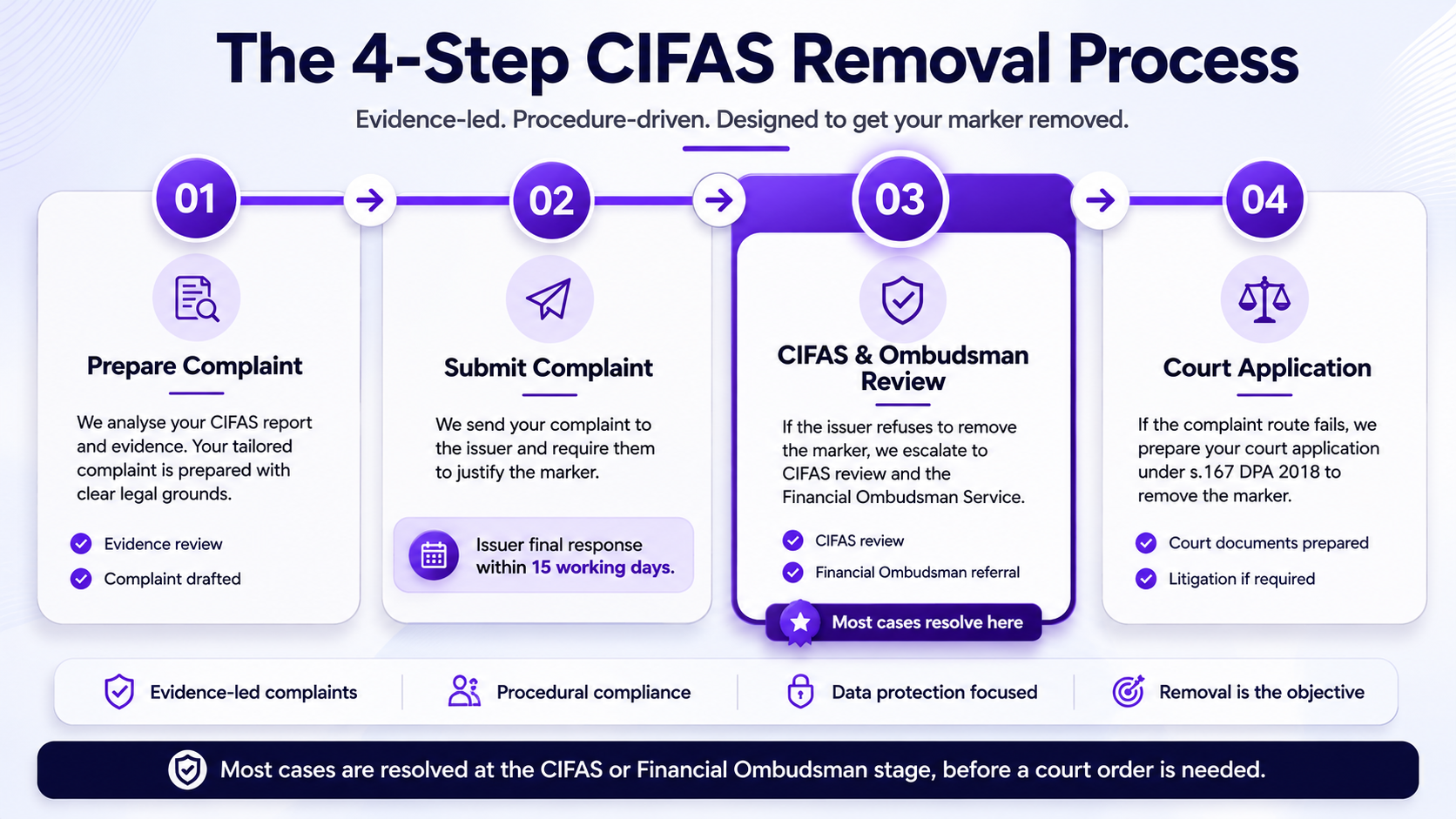
Dell CIFAS Marker Removal Process

A Dell CIFAS marker removal complaint should follow a clear process. The mistake most people make is sending a general complaint before they have the CIFAS report, issuer records, and supporting evidence in order.

CIFAS marker removal timeline

Do not send a generic, emotional complaint to Dell. You must follow a structured, evidence-led escalation process.

The process usually works like this:

  • Request your CIFAS DSAR so you can confirm the marker, category, filing date, and filing organisation
  • Request your Dell DSAR so you can see the records, application information, account material, product records, and fraud-review notes
  • Upload your CIFAS report, Dell records, and supporting evidence to your case file
  • We prepare the complaint letter, evidence summary, removal request, and escalation plan
  • You submit the complaint to Dell or the current trading entity responsible for the account
  • Dell reviews the complaint and usually has up to 8 weeks to issue a Final Response Letter
  • If the marker is not removed, the case can be escalated to CIFAS and the Financial Ombudsman Service where appropriate

Bookmark this page or share it with anyone helping you. The aim is simple: get the record, build the evidence, submit the complaint properly, and escalate if Dell does not remove the marker.

Dell

CIFAS DSAR And Dell DSAR

Before a Dell CIFAS marker can be complained about properly, you need the records. The CIFAS DSAR shows what has been filed on the National Fraud Database. The Dell DSAR helps identify what evidence the issuer relied on when the marker was filed.

You should request:

  • Your CIFAS report from CIFAS
  • Your account, application, product, or service records from Dell
  • Fraud investigation notes, internal review notes, and any evidence relied on for the marker
  • Copies of correspondence, complaint notes, and closure, refusal, restriction, or product decision records
  • Any application, account, product, transaction, affordability, or fraud investigation records used in the decision

The DSAR stage matters because it stops the complaint being based on guesswork. Once the records arrive, the marker can be reviewed against the category used, the evidence held, and whether the filing can be justified under CIFAS and data protection principles.

Dell

Prepare Dell Complaint

To prepare a strong Dell complaint, the evidence needs to show what happened, why the marker is disputed, and what impact it has had. You do not need to write the complaint yourself. The job at this stage is to upload the right information so the complaint can be built properly.

Upload anything you have, including:

  • CIFAS DSAR report
  • Dell DSAR response
  • Application or account records
  • Affordability, income, or product records
  • Bank statements or transaction evidence
  • Emails, letters, screenshots, or messages
  • Evidence of scams, pressure, third-party involvement, or misunderstanding
  • Account closures, refusals, or employment screening issues
  • A short explanation of what happened and why you say the marker is wrong or unfair

The more complete the upload, the stronger the complaint can be. We use the records to identify the marker category, the evidence problem, the data protection issues, and the practical impact of the marker before preparing the documents.

Dell

Dell Complaint Letter

The Dell complaint letter should not be a generic removal request. It should be built around the CIFAS category, the issuer records, the evidence, and the reason the marker should not remain.

We prepare a structured complaint package that can include:

  • Formal complaint letter to Dell or the current trading entity
  • Evidence summary
  • Marker removal request
  • Data accuracy and data protection arguments
  • Explanation of innocent circumstances, scam involvement, pressure, vulnerability, or third-party use where relevant
  • Impact summary covering banking, credit, employment, mortgage, or personal consequences
  • Escalation roadmap if the complaint is rejected

The complaint is designed to make Dell address the core issue: whether the marker is supported by clear evidence, the correct category, and a lawful basis for continued processing. If the evidence does not justify the marker, the complaint should ask for removal, correction, or restriction.

Dell

Submit Your Complaint To Dell

Once your complaint package is ready, we send you a ready-to-send email for Dell or the current trading entity responsible for the account. Where verified contact information is available, we include it with the complaint. If a direct complaint contact is not available, we explain how to find the correct firm and complaint details on the FCA Register.

Dell customer feedback and complaints PDF; Dell Financial Services privacy/contact route; verify whether complaint belongs to Dell Corporation Limited or Dell Bank International d.a.c. Useful links: complaints page, privacy notice, contact page, FCA Register.

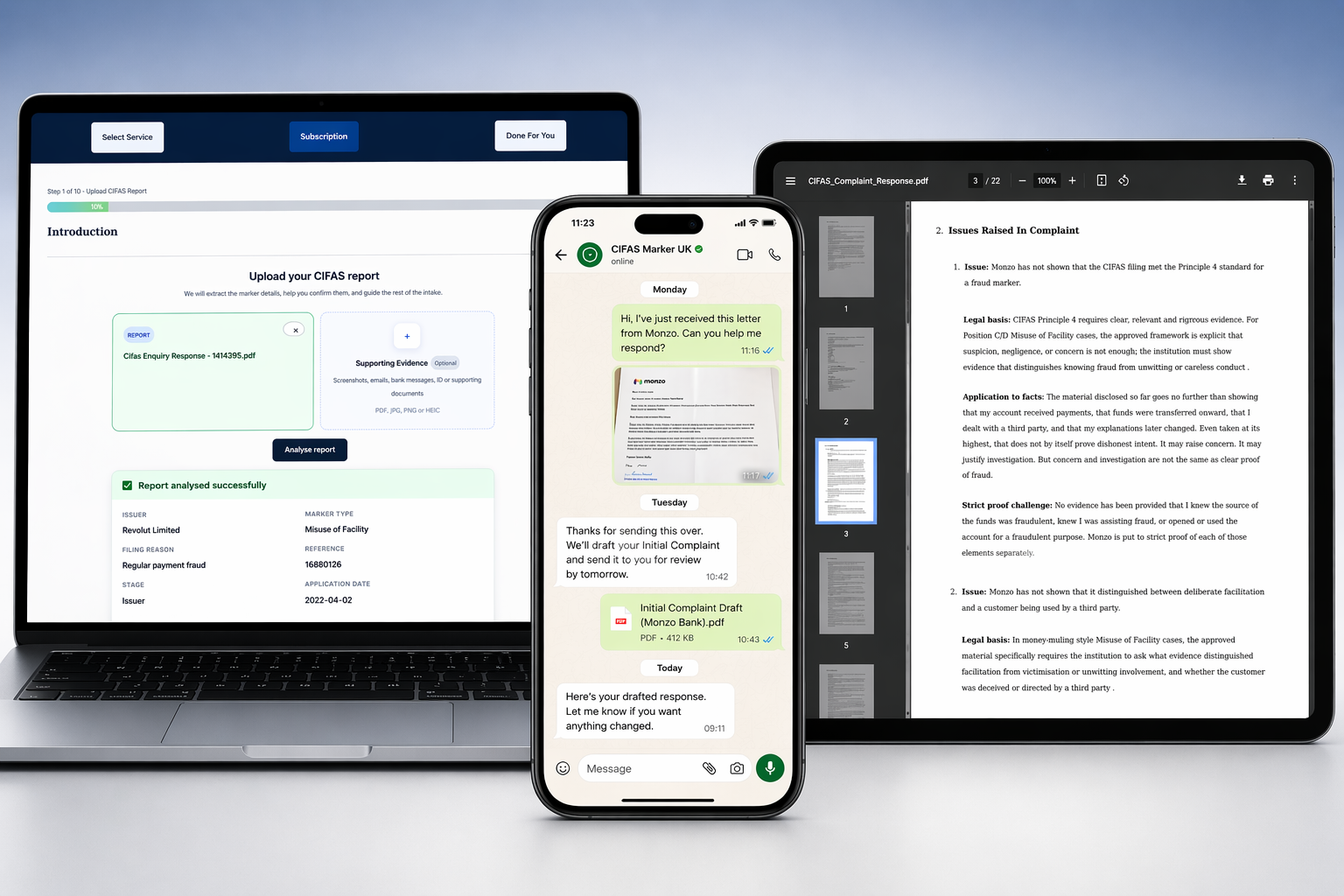
CIFAS marker complaint support across devices

Cifas Removal Support

Dell must respond within the relevant complaint deadline. Your letter must be strictly factual, evidence-led, and tied to the CIFAS category and data protection issues. If you are unsure how to structure your evidence, we can prepare a bespoke Dell complaint letter for you.

The ready-to-send complaint email can include:

  • Your formal Dell complaint letter
  • Evidence summary
  • Marker removal request
  • Supporting documents
  • Instructions on where to send the complaint
  • Guidance on checking the FCA Register if contact details need to be confirmed

After the complaint is submitted, Dell should acknowledge the complaint and investigate the issues raised. The issuer will usually have up to 8 weeks to provide a Final Response Letter.

As a subscriber, you also get access to our weekly CIFAS Removal Workshops and AI assistant support. This helps you understand replies from Dell, respond carefully to requests for more information, and avoid making mistakes that could weaken the complaint.

Dell

Dell Final Response

After your complaint is submitted, Dell should investigate the marker, review the evidence, and explain whether it will remove, correct, restrict, or maintain the CIFAS filing.

The Final Response Letter should explain:

  • The decision reached by Dell
  • The evidence it says supports the marker
  • The CIFAS category relied on
  • Whether the marker will be removed, corrected, restricted, or maintained
  • Your right to escalate the complaint if you remain dissatisfied

Do not treat a refusal as the end of the process. The Final Response Letter is an important document because it shows the reasons Dell is relying on. If the marker is not removed, upload the Final Response Letter to your case file so the next stage can be reviewed and prepared.

Dell

Escalate Dell CIFAS Marker

If Dell refuses to remove the marker, upload the Final Response Letter to your case file. Once we have reviewed the response, we prepare the documents needed to escalate the complaint to the Financial Ombudsman Service and CIFAS.

Financial Ombudsman Service

We prepare the Ombudsman complaint so you can register the dispute without starting again from scratch. In most cases, you simply forward the prepared email and documents to the Financial Ombudsman Service.

We prepare:

  • Ombudsman complaint form
  • Summary of what happened
  • Response to Dell's Final Response Letter
  • Evidence summary
  • Explanation of the marker impact
  • Supporting documents list
  • Draft email to send to the Ombudsman

The Financial Ombudsman Service reviews whether Dell acted fairly and reasonably. It may consider the evidence relied on by the issuer, your explanation, complaint handling, supporting documents, and whether maintaining the marker is fair.

Financial Ombudsman Representation

The Ombudsman will review the case completely afresh. To maximise your chances, your submission must clearly highlight how Dell failed to meet the Standard of Proof. Learn how our FOS Escalation Service handles the legal jargon for you.

CIFAS Review

We also prepare the information needed for the CIFAS online complaints form. This helps keep the CIFAS review focused on the marker category, the evidence, and whether the filing meets the standards required for the National Fraud Database.

We prepare:

  • CIFAS review comments
  • Answers for the CIFAS online form
  • Summary of the marker dispute
  • Response to Dell's reasons for refusal
  • Evidence summary
  • Explanation of why the marker should be removed, corrected, or restricted
  • Practical script for completing the CIFAS complaint form

CIFAS reviews whether the marker meets the standards required for inclusion on the National Fraud Database. It may consider the category used, the information supplied by Dell, whether CIFAS principles were followed, and whether the issuer has justified keeping the marker in place.

Dell

Expected Outcomes Of A Dell CIFAS Marker Complaint

A Dell CIFAS marker complaint can have different outcomes depending on the evidence, the category used, and how Dell responds to the complaint.

Possible outcomes include:

  • The marker is removed
  • The marker is corrected
  • The marker is restricted
  • Dell maintains the marker and explains why
  • CIFAS asks for more information before completing its review
  • The Financial Ombudsman Service asks further questions
  • The Ombudsman recommends or requires removal
  • Compensation is awarded for distress, inconvenience, financial impact, or other relevant loss

The goal is to make Dell justify the marker properly. If the evidence does not support the CIFAS category, or if the marker is inaccurate, unfair, or disproportionate, removal or correction should be requested.

If compensation is awarded by the Financial Ombudsman Service, it is paid directly to you. We do not charge a success fee and we do not take a percentage of any compensation awarded.

Dell

Dell CIFAS Marker Removal Pricing

Guided support

CIFAS Documents

Prepared complaint documents, weekly live webinars, WhatsApp support, and 24/7 AI support while you manage submission yourself.

£149.99/ month
Start CIFAS Documents
Most popular

CIFAS Representation

Managed complaint strategy, evidence review, issuer complaint, CIFAS review, and FOS referral support.

£1,500one-off
Start CIFAS Representation
Advanced route

CIFAS Court Order

Letter of Claim, Particulars of Claim, witness statement, exhibits, and Litigant in Person court-stage document support.

£5,000one-off
Start CIFAS Court Order

Cifas Service Comparison

Feature / Support Level1. DIY Route2. Guided Support (Monthly)3. Done For You (Bespoke)
Document DraftingManual, hours of researchInstant autonomous generationComplete document package
Strategy & SupportNone, forums onlyWeekly Live Webinars & 24/7 AIDirect 1-to-1 consultation
Target TimelinesUntrackedTracked via platform dashboardManaged escalation workflow
PricingFree£149.99 / month, cancel anytimeFixed one-off fee

Assess your Cifas Marker

  • Take our 2-Minute CIFAS Assessment to see if your Dell marker can be legally challenged.
  • Fixed-Fee Document Preparation.
  • Case Merits Assessment.

Issuer questions

Dell CIFAS Marker FAQs

What is a Dell CIFAS marker?+

A Dell CIFAS marker is a fraud-risk record connected to application, account, product, transaction, affordability, or fraud investigation records. It may affect banking, credit, mortgage applications, employment screening, and other financial services.

Can a Dell CIFAS marker be removed?+

Yes. A Dell CIFAS marker can be removed if the filing cannot be properly justified. The complaint needs to address the evidence, the marker category, and whether the marker is accurate, fair, and lawful under data protection principles.

How do I start removing a Dell CIFAS marker?+

Start by requesting your CIFAS DSAR and gathering any records you have from Dell. Then upload your CIFAS report, issuer records, supporting evidence, and a short explanation of what happened so the complaint package can be prepared.

What evidence do I need for a Dell CIFAS marker complaint?+

Useful evidence may include your CIFAS report, Dell DSAR response, account or product records, correspondence, screenshots, transaction records, fraud reports, refusal letters, and evidence showing the impact of the marker.

How long does Dell have to respond?+

After the complaint is submitted, Dell will usually have up to 8 weeks to investigate and issue a Final Response Letter. If no proper final response is received, or if the marker is maintained, the case may be ready for escalation.

What happens if Dell refuses to remove the marker?+

If Dell refuses removal, upload the Final Response Letter to your case file. We can then prepare the Financial Ombudsman complaint documents and CIFAS review responses so the matter can be escalated.

Can the Financial Ombudsman remove a Dell CIFAS marker?+

The Financial Ombudsman Service can require an issuer to remove or correct a marker where it decides the firm acted unfairly or unreasonably. It may also award compensation where appropriate.

Can CIFAS remove a Dell marker?+

CIFAS can review whether the marker meets the standards required for inclusion on the National Fraud Database. If the filing is not properly justified, CIFAS may require the issuer to amend or remove it.

Do I need to write the complaint letter myself?+

No. Once you upload your CIFAS report, Dell records, and supporting evidence, we prepare the complaint letter, evidence summary, removal request, and escalation roadmap for you.

Do you take a percentage of compensation?+

No. If compensation is awarded by the Financial Ombudsman Service or another route, it is paid directly to you. We do not charge a success fee and we do not take a percentage of your compensation.

CIFAS marker removal guide preview

Free self-paced guide

Read the Free CIFAS Civil Dispute Framework Guide

Understand the evidence route before choosing how to challenge a Dell CIFAS marker. The guide explains DSARs, issuer evidence, complaints, CIFAS review, FOS referral, and court-stage documents.

Self-pacedNo webinarDocument-led

The guide explains the process. Personalised document preparation begins after package selection.

CIFAS marker types

Check the marker category

Back to NFD members

Misuse of Facility

MOF

A Misuse of Facility marker usually means an organisation believes your own account or facility was used in suspicious or fraudulent activity, such as receiving or moving suspicious funds.

Learn more

False Application

FA

False Application usually means an organisation believes false information or documents were used in an application for a financial product or service.

Learn more

Facility Takeover

FT

Facility Takeover usually means an account or financial facility was taken over or used by someone without proper authority.

Learn more

Identity Fraud

IF

Identity Fraud usually means identity details were used to obtain a product or service fraudulently, sometimes affecting the victim if the marker is filed incorrectly.

Learn more

Asset Conversion

AC

Asset Conversion usually involves financed or leased goods being sold, retained, or not returned in a way the organisation says was dishonest.

Learn more

False Insurance Claim

FIC

False Insurance Claim usually means an insurer says an insurance claim involved a material falsehood, exaggeration, or false supporting information.

Learn more

Expert bio

Leo Musami

Civil Disputes Specialist with 7+ years' experience, former Accenture consultant, C2FO project manager, and Professional Representative for CIFAS Marker UK clients. Leo has helped thousands of consumers prepare dispute documents, complaints, and court-stage case files across civil and financial disputes.

Where clients choose representation, Leo acts as a Professional Representative, helping manage issuer complaints, CIFAS review, and Financial Ombudsman escalation.

View Leo Musami on LinkedIn

Legal Disclaimer

CIFAS Marker UK is a trading name of Civil Disputes UK Limited. We prepare complaint documents and manage the CIFAS Civil Dispute Framework. We are not a law firm, are not regulated by the SRA, and are not a Claims Management Company. Complaint Representation clients are supported as professional representatives consistent with FOS guidance on professional representatives. Court stage clients stand as Litigant in Person in accordance with the Civil Procedure Rules.

Specialist CIFAS marker removal firm

Challenge Your Dell CIFAS Marker

Professionally drafted complaint documents built around your marker, issuer, and evidence. We manage the process at every stage where your package includes representation.